
Corporate Design System, Machine Readable.
Executive summary
Goal
Make a 91-component design system legible to AI agents without tying it to one vendor.
My role
Strategy | Engineering | Writing | Roadmap | Solo from concept through shipping
Team
Solo.
Timeline
2026.
Constraint
Agents could inspect code but could not read the system's usage rules, patterns or design judgment.
Proof
Claude built a Figma landing page from real components and tokens. Seven audits exposed 35 drifted color values, 22 unregistered components and 13 orphaned compositions.
Live system
Overview
Every company is handing production work to AI agents right now. The agents are fast, confident and blind. They can't see the design system they're supposed to follow, so they guess: near-miss colors, invented layouts, components that almost match. Every guess costs a review cycle. The drift compounds quietly until the design system, the most expensive consistency tool a company owns, stops paying for itself.
I fixed that for a 91-component design system. Not by betting on an AI tool, but by restructuring the system itself so any agent can read it: what exists, when to use it and how it composes into pages.
The proof: I connected Claude to the system and asked for a marketing landing page in Figma. It built one from real component instances bound to real tokens. Nothing traced. Nothing hardcoded. Edit the Button once and all five instances on the page update.
The opportunity in AI right now isn't "use it to make a thing." It's "structure your existing thing so AI can read it."
The systems that aren't doing this will be obvious within a year.
Process
The strategic bet
Most "AI for design systems" conversations pick a tool first, then bend the system to fit it. That's brittle. Tools change. Vendors come and go and every integration built on them goes too.
I inverted the question: what does my design system look like to an AI agent today and what's the minimum I'd need to add to make it legible? The answer was to skip the tool entirely. Make the system discoverable as data and let whichever tools win read it.
Making the system addressable
An agent landing in a repo has one question: what's here? Today, answering it means crawling source files and guessing at APIs. That's slow and it's wrong often enough to be dangerous.
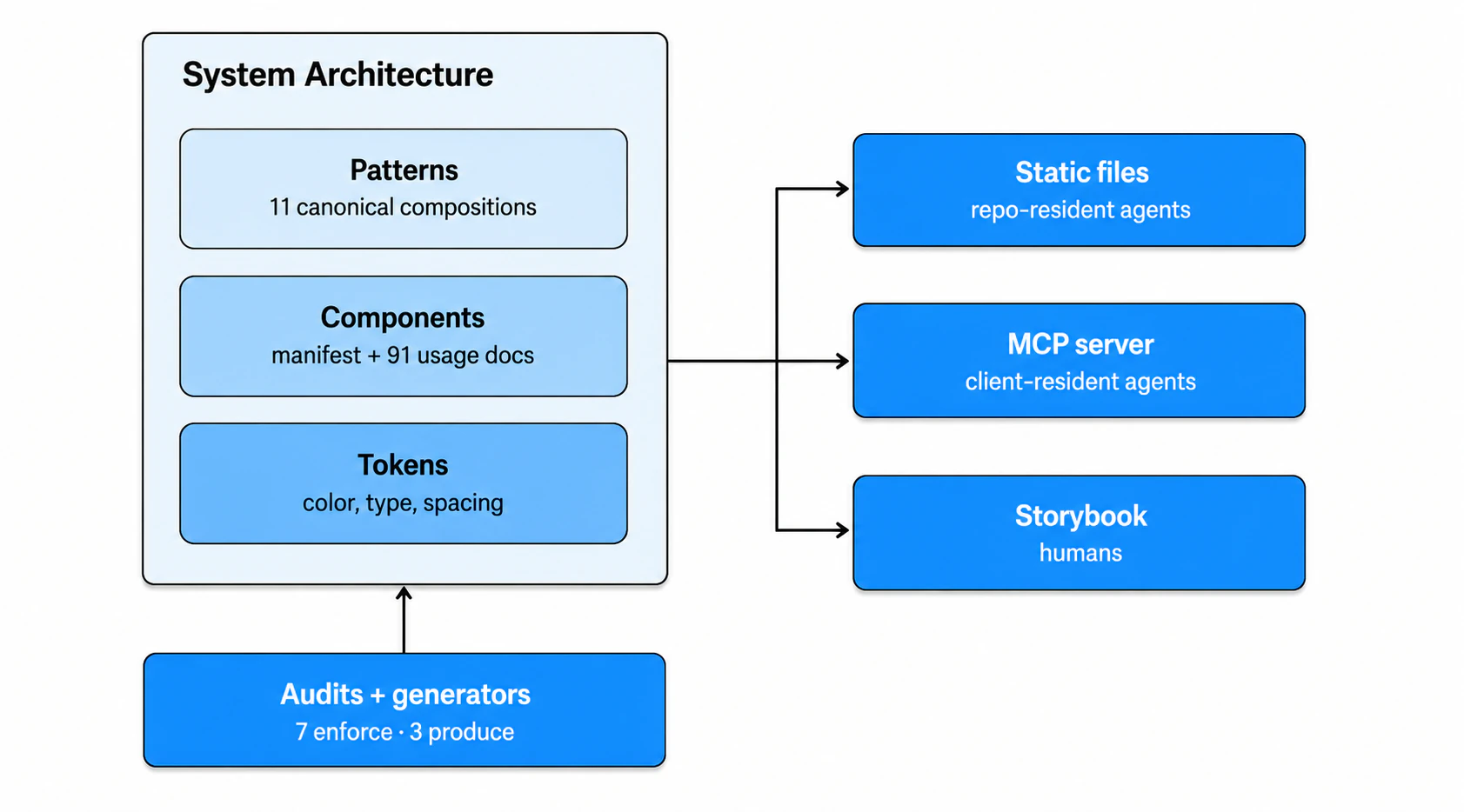
So I gave the repo an answer it can hand over in one read. AI.md at the root tells any agent what exists and where to find it. One screen. Underneath, an ai/ directory with two structured files: tokens.json for color, type, spacing, radius, elevation and motion, and manifest.json cataloging every component with its name, category, source path and purpose. An agent can answer "what components exist" without touching the file tree.
Usage docs: where the tribal knowledge lives
Here's the expensive gap in most design systems: the docs explain how a component works, never when to use it. A Button properties table lists the variants. It doesn't say when primary beats outline. That judgment lives in design review comments and senior designers' heads, which means every new hire and every AI agent relearns it the slow way.
I wrote 91 usage docs, one per active component, each built on the same structure: purpose, when to use, when not to use, common mistakes and a real example. The "when not to use" section is the payload. "Don't use two primary Buttons side by side" used to be a review comment that evaporated after the PR merged. Now it's portable guidance any agent, or any new designer, gets for free.
That's 100% coverage of the active component surface.
A component API explains what is possible. Usage guidance preserves the judgment behind the choice.
Patterns: answering the real question
Nobody hires a design system to answer "how do I use Button?" The real question is "how do I build a marketing landing page?" Component docs can't answer it, so agents invent layouts.
ai/patterns.json holds 11 canonical compositions: six page-level patterns and five section patterns, each listing its components, pointing at a sample page and linking to a doc with working code samples. The code samples matter. They turn the doc from descriptive into generative. An agent gets a working starting point, not a diagram.
The system now audits itself
A machine-readable surface has a side effect I didn't design for: the system can check its own integrity. Seven scripts wired into npm run audit catch hardcoded colors, undocumented components, broken references and drift between layers.
The first runs paid for the whole effort. One audit found a parallel token source with 35 hex values that had quietly drifted from the real palette. Another surfaced 22 components missing from the manifest entirely. A third found 13 components used in sample pages but absent from any pattern, which drove three new pattern docs. Every one of those problems existed before. They were just invisible. Without a machine-readable surface, that drift stays hidden until a customer sees it.
Once the system became readable by machines, it could finally inspect and audit itself.
MCP: a live interface for agents outside the repo
Static files serve agents working inside the repo. Agents living in client apps like Claude Desktop prefer a typed tool call. So the system is also a live MCP server at /mcp on the Storybook domain, powered by @storybook/mcp and deployed as a Cloudflare Pages Function on the same deploy.
Four tools: three documentation tools and one I built that returns a rendered Storybook URL for any story with custom props. That last one means an agent can show a user exactly what its suggestion looks like without writing or running code.
Proof it works
Claude Desktop, connected to the MCP server and Figma's API. I asked it to compose the Marketing Landing pattern.
It read the manifest, the tokens, the pattern doc and each component's typed API. Then it built the page in Figma from real component instances bound to my actual semantic color and text styles. Five Button instances across the page. Edit the Button once, all five propagate.
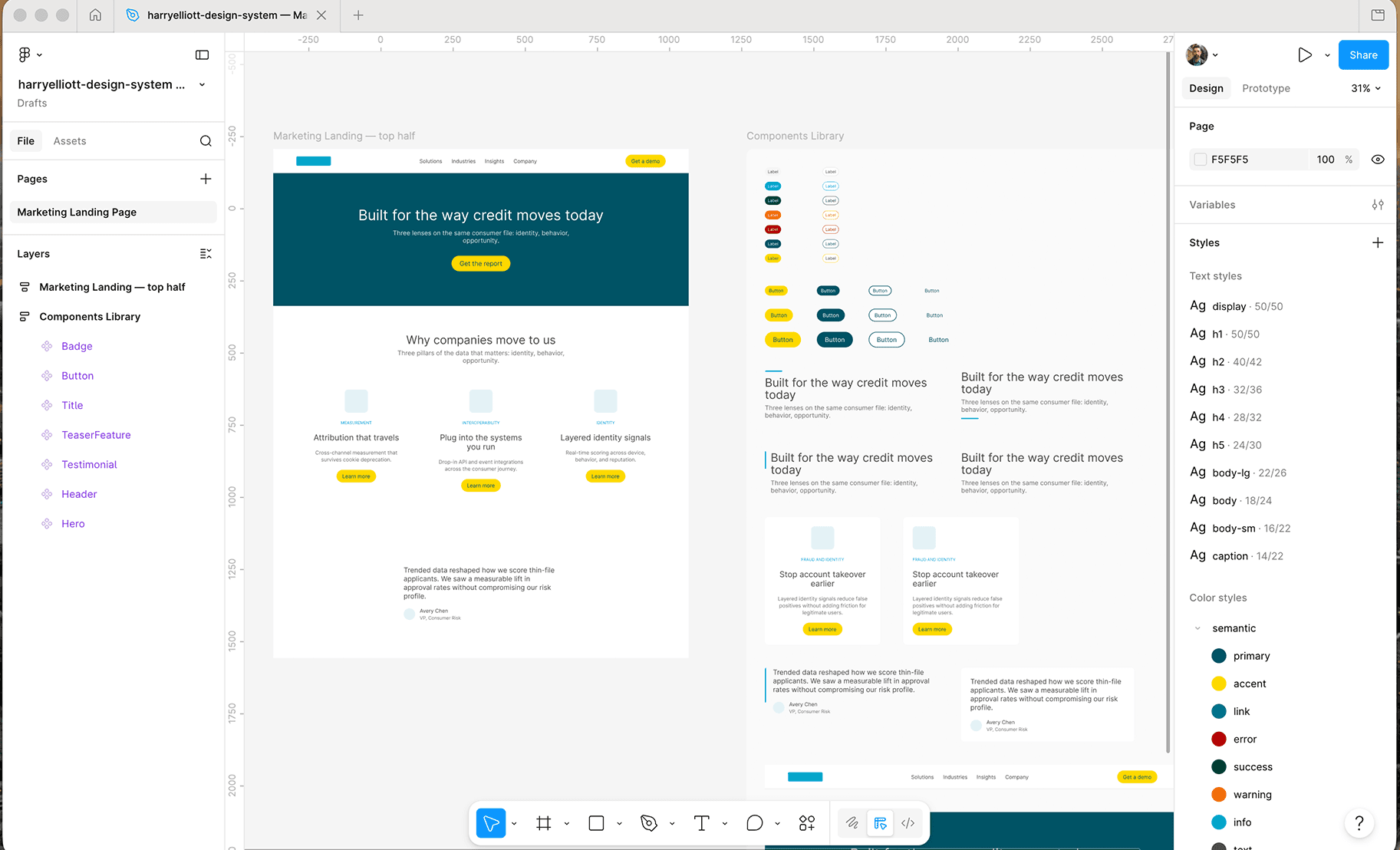
Every fill, stroke and text value resolved to a real token. Take away any layer and the demo collapses. No manifest and the agent greps source and guesses the API. No tokens.json and it hardcodes colors. No pattern doc and it invents a layout. The documentation, tokens and machine-readable files carried the demo.
Outcome
The design system went from invisible to AI agents to fully readable by them through two access points: static files for repo-resident agents and MCP for client-resident agents.
What that buys, concretely. Agents compose real pages from real components instead of guessing, demonstrated end to end in Figma. Tribal knowledge that lived in review comments is now portable guidance with 100% component coverage. And the system polices its own integrity: audits have already caught 35 drifted color values, 22 unregistered components and 13 orphaned compositions no human had noticed.
None of it depends on any specific AI vendor. When the tools change, the system stays usable.
What's next
The Figma demo surfaced three gaps: typography belongs in tokens.json, Figma needs a font mapping layer for commercial faces and the MCP needs a get-tokens tool so all three layers resolve through one protocol. Each is one focused commit.